

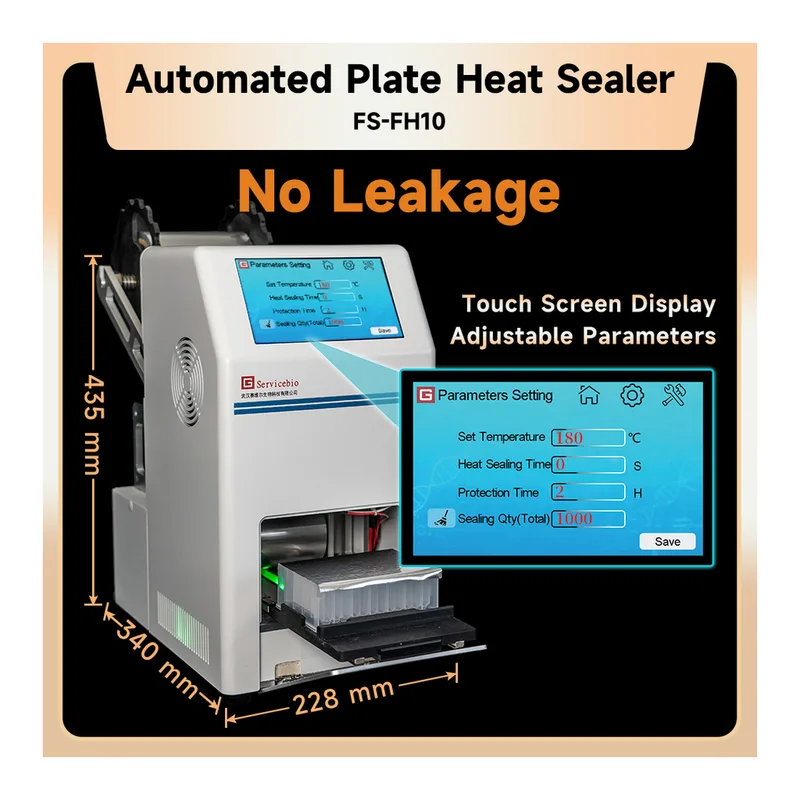
AI 생성AI가 생성·보정한 이미지예요. AI는 실수할 수 있으니 실제 제품과 다를 수 있어요.
1 / 2Servicebio Automated Plate Heat Sealer
상품 한눈에 보기
열압착 기술로 PCR 및 96웰 플레이트를 자동 밀봉하는 장비. 샘플 손실과 교차 오염을 방지하며, 투명 및 알루미늄 열밀봉 필름 모두 사용 가능. 간단한 조작으로 완전 자동 밀봉 수행. 안정적 구조와 안전 기능 내장.
- 브랜드
- Servicebio
- 판매단위
- pk
카탈로그
1개 옵션 · 카탈로그 번호를 클릭하면 복사됩니다회원가입 없이 바로 구매하세요
가입하지 않아도 비회원가로 구매하실 수 있습니다.
카탈로그 번호 · 상품 설명출고판매가담기
ADADBIX 2026 전시회10/28~30 코엑스 · 사전등록 안내자세히보기Servicebio FS-FH10 Automated Plate Heat Sealer pk판매 단위 pk ·
재고 확인 필요
18,500,000원VAT 포함 20,350,000원
Servicebio · Servicebio Automated Plate Heat Sealer
Product Description
This automated plate heat sealer utilizes thermal pressure technology to achieve tight, leak-free sealing. It effectively prevents sample loss and cross-contamination, compatible with PCR plates and 96-well deep well plates (2.2 mL and 1.6 mL). The system enables fully automatic sealing with both transparent and aluminum thermal sealing films, ensuring reliable and reproducible results.
Product Parameters
| Specification | Details |
|---|---|
| Model | FS-FH10 |
| Dimension (L × W × H) | 340 mm × 228 mm × 435 mm |
| Plate Type for Sealing | PCR plates, 96-well deep well plates (2.2 mL and 1.6 mL) |
| Power | 450 W |
| Adapter | PCR plate adapter, 96-well deep well plates (1.6 mL) |
| Net Weight | 15 kg |
Operation Steps
- Connect the power and turn on the power switch. The screen lights up and the instrument performs a self-test.
- After the self-test, the main interface appears for heat sealing operation.
- Install the rolling film and set the appropriate feeding length.
- Click Set to enter the temperature parameter setting interface. Adjust temperature and time according to film requirements.
- After setting parameters, click Back to return to the main interface.
- Click Heating and wait for the heating block to reach the set temperature.
- Place the appropriate adapter and plate on the loading platform.
- When the actual temperature reaches the set value, press Start to begin automatic sealing.
- After sealing, the plate is automatically ejected.
- Remove the sealed PCR or 96-well deep well plate.
Note:
If operation or sample placement is incorrect, click Stop to halt the process and remove the plate safely.
Notes
- Do not place objects in front of the instrument door to avoid impact when opening.
- Do not open the front door during operation to prevent injury.
- Turn off and unplug the instrument when not in use for extended periods.
- Avoid touching the heating block during or immediately after operation to prevent burns.
- If the instrument malfunctions, unplug it immediately.
- Handle the power cord carefully and ensure electrical safety.
Related Product Classification
- Molecular Biology Reagents
- Consumables
- Nucleic Acid Amplification
- Consumables and Instruments Related
Servicebio is a leading manufacturer in China providing FDA & CE approved laboratory supplies and services.
Servicebio 상품 둘러보기
전체보기
문의
0개 · 배송·재고 문의는 실시간 상담이 빠릅니다아직 등록된 문의가 없어요.